Friday, November 23, 2012

Chapter 2 Practical - WordProcessing


Word Processing


-Text Editing = Text can be changed by deleting it, typing over it or by inserting additional text within it.

-Word Wrap and Centering = Text can be centred between left and right margins.

-Search and replace, Move and Copy = Any type of text can be replaced with another block of text. You can mark a text and move it elsewhere in the doc. or copy it throughout the doc.

-Layout Settings = Margins, tabs, line spacing, indents, font changes, underlining, boldface and italics can be set and rest anywhere in the doc.

Headers, Footers and Page Numbering = They are common text printed on the top and bottom of every page. They can be set and reset anywhere within the doc. page numbering in optional Roman numerals / alphabetic letters is common.

-Style sheets= When you apply a style, you apply a whole group of formats in 1 simple task example: Table of Contents/ Index/ Arial, 14 pt etc.


- Clipart and Picture= A picture can be resized, rotated and anchored so that it remains with a particular segment of text.

-Preview, Print and Group Print = A doc. can be previewed before it is printed. A doc. can be printed both individually/ as a group.

-Footnote and Endnotes= Footnotes can be made at any place of the doc. ant the endnote printed at the end of a page of a doc.

-Spelling Checker and Thesaurus= Spelling an individual word can be checked. A thesaurus displays synonyms for the word at the current location.

-Columns= mainly used in newspaper/ magazines.

-Mail Merge= Is used to create personalized letters by combining together a form letter and a list of data. (instead of writing a name in every mail you can use the mail mage and all the names will appear automatically)(from references)

-Table of Contents= Is a list of headings in a document. You can use a table of contents to get an overview of the topic discussed in a doc. (To make it you have to change every title into Heading 1 / Heading 2 etc. so that the computer will notice it.)

-Indexes= An index list the terms and topics discussed in a doc. along the pages they appear on. (select every word you want to be seen in the indexes by pressing ALT+SHIFT+X)(find from References)

Monday, October 8, 2012

Chapter 1 Practical - Utilities.


Utilities.


-Formatting a Diskette = When you format a disk, you DIVIDE THE DISK into areas called TRACKS and SECTORS (Insert floppy disk / my computer / right click on the drive you want to format / select format from the menu/ Full Option / label for your disk / Copy system files / start button / to make sure that the disk is formatted = close button (on the result window).

-Scan Disk = It checks your disk for ANY ERRORS or FAULTS.

-Defragmentation =  REARRANGES the files and free space on your disk so that the loading is faster.

-WinZip / Compressed Folder = Folders are compressed using this type of folder so that the folder will USE LESS SPACE.

-Virus and Antivirus = An antivirus software serves to PROTECT your computer from viruses. ( you can download them free from the internet eg. MacAfee / Norton Antivirus etc... )

THIS IS A PICTURE OF A SCAN DISK. 


Thanks for reading about Utilities.

Sunday, October 7, 2012

Chapter one- The Computer System

                                                    The Computer System


-Data and Information = Data + structure = Information

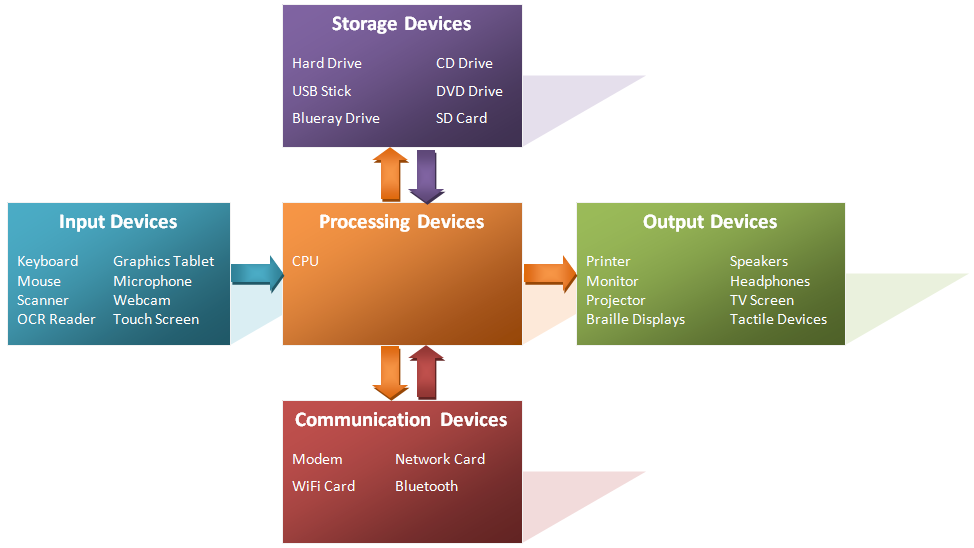
-Input = the things that a person can touch so she/he can enter a data to a computer. An                                          example of an INPUT is a : keyboard, microphone and scanner. 

-Output = The things that a person can touch so he/she can get processed data out of the computer. An example of an OUTPUT is a : printer,monitor and speakers.

-Processing = The TRANSFORMATION of a data so that a person can get the information wanted.

-Storage = The space were data is SAVED so that you can use it for later.

-Retrieval = When the data is taken from the computer so that it can BE READ.

-Supercomputers = Are very powerful computer, and they are mostly used for BIG COMPANIES.

-Mainframe Computers = Less powerful than a supercomputer and they are even used for LARGE ORGANISATION example : airlines and banks.

-Microcomputers = It's the kind of computer that you can find it AT HOME. Example : a Person Computer / Desktop Computer / Portable Computer example: a Laptop / Notebook  

-Embedded Computers = A much more SMALLER AND MUCH MORE MODERN DEVICES  than the Microcomputer / built-in computer. Example: camera, Hi-Fi and playstation.

-Application Software = The kind of  software that people USE TO PERFORM a general-purpose task, example : A person uses the Word processing to write text.

-System Software = The software that the computer uses to manage TO RUN THE APPLICATION SOFTWARE.

-A Bus = A set of parallel wires CONNECTING two or more units of a computer. The three different types of buses : The address bus , The data Bus and the The control Bus.

THIS IS A DIAGRAM OF A COMPUTER SYSTEM WITH DIFFERENT EXAMPLES.


THANKS FOR READING ABOUT THE COMPUTER SYSTEM.

Saturday, September 29, 2012

Smart phones


Well, now a days every phone is being programmed similar to a computer - Power Point and Microsoft office word on Samsung galaxy Si9000


Friday, September 28, 2012