Monday, October 8, 2012

Chapter 1 Practical - Utilities.


Utilities.


-Formatting a Diskette = When you format a disk, you DIVIDE THE DISK into areas called TRACKS and SECTORS (Insert floppy disk / my computer / right click on the drive you want to format / select format from the menu/ Full Option / label for your disk / Copy system files / start button / to make sure that the disk is formatted = close button (on the result window).

-Scan Disk = It checks your disk for ANY ERRORS or FAULTS.

-Defragmentation =  REARRANGES the files and free space on your disk so that the loading is faster.

-WinZip / Compressed Folder = Folders are compressed using this type of folder so that the folder will USE LESS SPACE.

-Virus and Antivirus = An antivirus software serves to PROTECT your computer from viruses. ( you can download them free from the internet eg. MacAfee / Norton Antivirus etc... )

THIS IS A PICTURE OF A SCAN DISK. 


Thanks for reading about Utilities.

Sunday, October 7, 2012

Chapter one- The Computer System

                                                    The Computer System


-Data and Information = Data + structure = Information

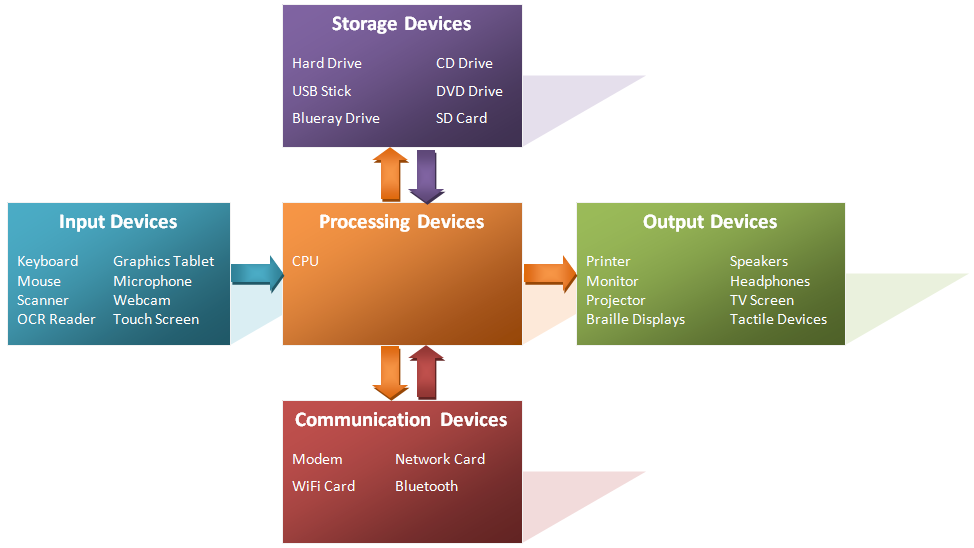
-Input = the things that a person can touch so she/he can enter a data to a computer. An                                          example of an INPUT is a : keyboard, microphone and scanner. 

-Output = The things that a person can touch so he/she can get processed data out of the computer. An example of an OUTPUT is a : printer,monitor and speakers.

-Processing = The TRANSFORMATION of a data so that a person can get the information wanted.

-Storage = The space were data is SAVED so that you can use it for later.

-Retrieval = When the data is taken from the computer so that it can BE READ.

-Supercomputers = Are very powerful computer, and they are mostly used for BIG COMPANIES.

-Mainframe Computers = Less powerful than a supercomputer and they are even used for LARGE ORGANISATION example : airlines and banks.

-Microcomputers = It's the kind of computer that you can find it AT HOME. Example : a Person Computer / Desktop Computer / Portable Computer example: a Laptop / Notebook  

-Embedded Computers = A much more SMALLER AND MUCH MORE MODERN DEVICES  than the Microcomputer / built-in computer. Example: camera, Hi-Fi and playstation.

-Application Software = The kind of  software that people USE TO PERFORM a general-purpose task, example : A person uses the Word processing to write text.

-System Software = The software that the computer uses to manage TO RUN THE APPLICATION SOFTWARE.

-A Bus = A set of parallel wires CONNECTING two or more units of a computer. The three different types of buses : The address bus , The data Bus and the The control Bus.

THIS IS A DIAGRAM OF A COMPUTER SYSTEM WITH DIFFERENT EXAMPLES.


THANKS FOR READING ABOUT THE COMPUTER SYSTEM.